8 Best CRMs for Gmail + Top Features

Learn what features to expect & how each Gmail CRM stacks up
If you’re using Gmail (whether a personal Gmail or a business email via Google Workspace), then you’re in luck. It allows for the best and most stable integrations with your CRM (if you don’t believe me, ask our tech team 😏).
Quick answer: Salesflare is my top pick for small and medium-sized B2B sales teams that want Gmail activity and relationship data captured automatically, with less CRM admin. Copper is a strong fit for teams centered on Google Workspace, Streak for managing pipelines entirely inside Gmail, and HubSpot for combining sales with marketing and service. The best fit depends on what you want Gmail to do for your team.
The table below matches all eight CRMs to a buyer need. After that, I explain what a Gmail CRM does, the ten-feature checklist and how I compare the products using hands-on tests, G2 reviews and Google Workspace Marketplace ratings.
Here we go! 👇
Which Gmail CRM should you choose?
| CRM | Best for | How it works with Gmail | Main trade-off |
|---|---|---|---|
| Salesflare | Small and medium-sized B2B teams that want less CRM admin | Full CRM in the Gmail sidebar, with automatic contact creation, email and meeting capture, and signature enrichment | Built for B2B relationship sales; less suited to high-volume, transactional B2C sales |
| Copper | Teams centered on Google Workspace | Gmail sidebar with email/calendar sync and automatic contact creation | Expensive compared with other options here for the features tested, and no automatic contact enrichment from email signatures |
| HubSpot | Teams combining sales, marketing and service | CRM tools in Gmail, with logging, tracking and sequences | Advanced sales functionality requires higher-priced plans |
| Streak | Gmail-first users with straightforward pipeline needs | CRM built into the Gmail interface | No dedicated standalone web app; less suitable if you want to work outside Gmail |
| folk | Relationship management, prospecting and warm introductions | Contact capture, context and templates in Gmail; deeper outreach in folk | Its Gmail Sender does not send sequences or track opens and clicks |
| Freshsales | Teams prioritizing a broad sales feature set | Gmail add-on for contacts and deals, plus email/calendar sync | No automatic contact creation or signature enrichment in this comparison |
| Zoho CRM | Budget-conscious teams wanting basic Gmail CRM access | Gmail add-on and email/calendar sync | More manual contact upkeep; limited Gmail automation in this comparison |
| Pipedrive | Teams prioritizing a simple visual sales pipeline | Gmail sidebar and email/calendar sync | Much of the sales workflow happens in Pipedrive; fewer features directly inside Gmail |
Gmail sync is not the same as automatic CRM upkeep. Check whether a tool only logs emails or also creates contacts, enriches their details and keeps relationship history up to date. The detailed reviews below explain the features and the plans needed to get them.
What is a CRM for Gmail?
A CRM for Gmail is a customer relationship management tool integrated directly into your Gmail inbox. It allows you to seamlessly manage client interactions, track deals, and access sales data without leaving Gmail. By integrating your CRM directly into your email workflow, you stay organized, respond faster, and maintain comprehensive records effortlessly.
When do you use it? Whenever you’re reading, sending, or managing emails and need immediate CRM functionalities at your fingertips. The benefits? Enhanced email productivity, easier follow-ups, and streamlined sales management; all within your Gmail interface.
Core features of Gmail CRMs
Here are 10 core features you can expect from a CRM that is well integrated with Gmail:
- Update and use your CRM from within your Gmail inbox
- Live sync your Gmail emails & Google calendar meetings to the CRM
- Auto-create contacts for people you’re emailing or meeting with
- Automatically enrich your contact database by syncing your contacts’ email signatures
- Send automated, personalized email sequences from your Gmail inbox
- Use (shared or private) email templates when sending emails from Gmail
- See who your colleagues know and how well, with “relationship strength scores” based on their email traffic
- Track whether people open your emails and click on the links in your emails sent from Gmail
- See whether these people who clicked email links also visit your website, which pages and for how long
- Be reminded of emails you haven’t replied to or customer conversations that have gone quiet
That’s a lot of useful stuff to follow up your leads better and boost your productivity 😄 I’ll detail below which of these features come with each CRM.
Ranking Gmail CRMs: our methodology
If you’re looking for a CRM that integrates well with your Gmail environment, the above set of features can significantly boost your productivity. To compile this ranking, I went through a list of around 800 possible CRMs to make a pre-selection. Then I tested every one of the 8 selected CRMs for Gmail first hand and researched which of them offer which features and detailed this for you below.
It is however important to keep the bigger picture in mind when comparing CRMs, because you need to make sure your team will actually use it as well. Getting a CRM that nobody uses is pretty useless as well 😏
Because of that, I’ve included the current scoring for each CRM on G2 so you get a better idea of how each CRM stacks up. It’s broken down as follows:
- Ease of Use
- Ease of Setup
- Meets Requirements
- Quality of Support
- Ease of Doing Business With
- Ease of Admin
And to top it off, I also incorporated the review score each CRM gets on the Google Workspace Marketplace. ⭐⭐⭐⭐⭐
I then took the average of the feature score, the average G2 review score, and the Google Workspace Marketplace score, to calculate… the final score! 🥇
The 8 Best CRMs for Gmail ranked
Don’t want to read the whole comparison? 🤓
The top 8 best CRMs for Gmail in 2026 are:
- Salesflare: 9.8/10 🏆
- Copper: 8.1/10
- HubSpot CRM & Sales Hub: 7.9/10
- Streak: 7.7/10
- Folk: 7.4/10
- Freshsales by Freshworks: 6.6/10
- Zoho CRM: 5.6/10
- Pipedrive: 4.9/10
Want to dig into the details? Read on!
1. Salesflare [9.8/10] 🏆
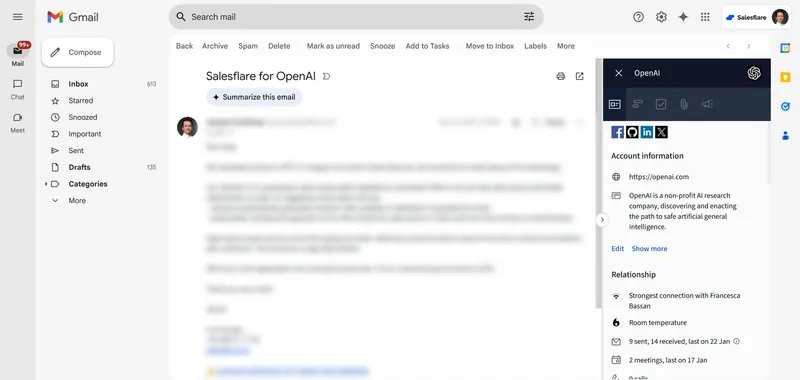
Best for: Small and medium-sized B2B sales teams that want less CRM admin through automatic contact and activity capture. Salesflare captures Gmail emails, Google Calendar meetings and contact information, enriches records from email signatures, and brings that context into the Gmail sidebar to help you follow up. This automatic data capture is also the foundation of Salesflare’s broader approach to intelligent sales automation and AI.
Main trade-off: Built for B2B relationship sales; less suited to high-volume, transactional B2C sales.
Salesflare (founded in 2014) is used by thousands of small and medium-sized businesses who sell to other businesses (incl. agencies, consultancies, development houses, tech companies, …). It’s top ranked across review platforms and is the #1 CRM on Product Hunt, the leading community for product enthusiasts.
Salesflare’s Gmail plugin (also for LinkedIn!) doesn’t only offer a really tight integration (more on that below). What’s absolutely unique about it is that it brings 100% of the CRM functionality into Gmail, so you never need to switch tabs while selling (although if you want to use Salesflare in a separate tab and do all the same things from there, that is fully possible too 👊).
“[I like the] LinkedIn & Gmail integration, and the ability to send automated email sequences using a Gmail alias! I love how it pulls their socials & populates other useful info. Love their mobile app & timeline feature too!” writes Quan N., founder of a software company, about Salesflare.
If you’re a little technical: Salesflare is built on Google’s cloud server infrastructure with Google-led technologies like Angular. It also follows Google’s “Material Design” design language, so if you notice that it looks a little similar to the Google products you’re using already, that’s why. 😄
Testing it out
When you test Salesflare, you immediately notice how seamlessly it integrates with your Gmail inbox. The automated data entry feature is particularly impressive; as soon as you connect your email and social accounts, Salesflare starts pulling in information and creating detailed customer profiles without any manual input. You find that it gathers contact information, company data, and even social media profiles to build comprehensive records for each lead.
The email and meeting tracking features stand out as well. Every email you send and receive is automatically logged into the CRM, including details about when it was opened and any links the recipients clicked. This provides a clear view of lead engagement, helping you prioritize follow-ups. Additionally, Salesflare tracks your meetings and adds them to the timeline with notes and action items, ensuring you never miss a detail.
Scoring
Without further ado, here’s an analysis of how Salesflare stacks up:
Features Salesflare offers: 10/10
- Update and use your CRM from within your Gmail inbox
- Live sync your Gmail emails & Google calendar meetings to the CRM
- Auto-create contacts for people you’re emailing or meeting with
- Automatically enrich your contact database by syncing your contacts’ email signatures
- Send automated, personalized email sequences from your Gmail inbox
- Use (shared or private) email templates when sending emails from Gmail
- See who your colleagues know and how well, with “relationship strength scores” based on their email traffic
- Track whether people open your emails and click on the links in your emails sent from Gmail
- See whether these people who clicked email links also visit your website, which pages and for how long
- Be reminded of emails you haven’t replied to or customer conversations that have gone quiet
Features Salesflare doesn’t offer: none
G2 review scoring:
- Ease of Use: 9.3
- Ease of Setup: 9.4
- Meets Requirements: 9.1
- Quality of Support: 9.7
- Ease of Doing Business With: 9.8
- Ease of Admin: 9.3
Final result
- Gmail CRM feature score: 10/10
- Average G2 review score: 9.4/10
- Google Workspace Marketplace review score: 5.0/5 → 10.0/10
- FINAL SCORE: 9.8/10
Pricing
Pricing to get all of the above (10 of 10 features) on the Salesflare Pro plan:
- $49/user/month(billed annually)
- $64/user/month(billed monthly)
Salesflare offers a free trial of up to 30 days.
Try Salesflare
Want to see it all in action? You can try Salesflare for free. 👈
It only takes a few minutes to start a Salesflare trial and install the Gmail plugin (it’s easiest in that order).
Try it with Gmail to see how automatic data capture can help you follow up without constantly updating your CRM.

2. Copper [8.1/10]
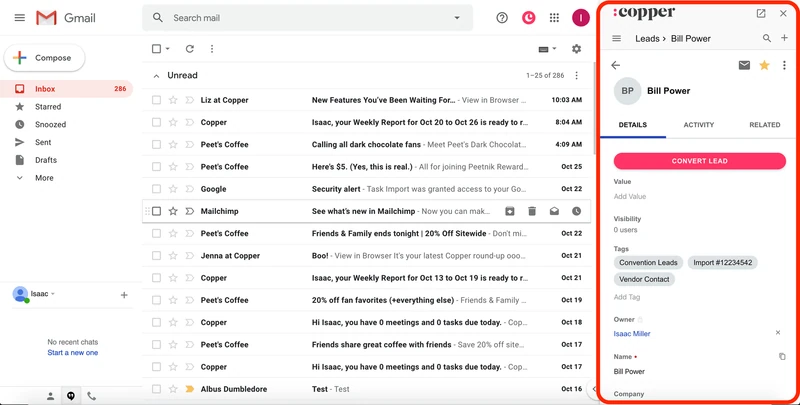
Best for: Teams centered on Google Workspace that want to manage contacts and sales from Gmail.
Main trade-off: Copper is expensive compared with other options here for the features tested. It creates contacts automatically, but does not enrich them from email signatures.
Copper is a CRM software company founded in 2012 that fully focuses on serving Gmail users, which is why it deserves its second place in this Gmail CRM ranking.
Its target industries are relatively similar to Salesflare’s, additionally serving real estate clients, as the software is not focused on B2B sales. This allows the company to reach a larger target audience, but inevitably also makes using it a little less straightforward for its B2B users.
When objectively comparing scores, the main differences are a more difficult set-up, lower quality support, and the absence of two Gmail productivity features. Also, the pricing to get all below functionality (8 features) is more than double.
Testing it out
When I tested Copper, the first thing I noticed was its tight integration with Gmail. Setting it up took a bit more time than I anticipated, but once everything was connected, it functioned smoothly. The ability to update the CRM directly from my inbox was convenient, and I appreciated how emails and calendar events were synced in real time.
One feature that stood out was the automatic contact creation. Whenever I emailed someone new, Copper would automatically create a new contact for them in the CRM, saving me a lot of manual data entry. However, I found the lack of automatic data enrichment to be a bit of a drawback, as it required additional effort to gather complete contact information.
Scoring
Features Copper offers: 8/10
- Update and use your CRM from within your Gmail inbox
- Live sync your Gmail emails & Google calendar meetings to the CRM
- Auto-create contacts for people you’re emailing or meeting with
- Send automated, personalized email sequences from your Gmail inbox
- Use (shared or private) email templates when sending emails from Gmail
- Track whether people open your emails and click on the links in your emails sent from Gmail
- See whether these people who clicked email links also visit your website, which pages and for how long
- Be reminded of emails you haven’t replied to or customer conversations that have gone quiet
Features Copper doesn’t offer:
- Automatically enrich your contact database by syncing your contacts’ email signatures
- See who your colleagues know and how well, with “relationship strength scores” based on their email traffic
G2 review scoring:
- Ease of Use: 9.1
- Ease of Setup: 8.7
- Meets Requirements: 8.7
- Quality of Support: 8.6
- Ease of Doing Business With: 9.0
- Ease of Admin: 8.9
Final result
- Gmail CRM feature score: 8/10
- Average G2 review score: 8.8/10
- Google Workspace Marketplace review score: no listing/rating found → average substitute: 7.6/10
- FINAL SCORE: 8.1/10
Pricing
Pricing to get all of the above (8 of 10 features) on the Copper Business Plan:
- $99/user/month (billed annually)
- $134/user/month (billed monthly)
Copper offers a free trial of 14 days.
3. HubSpot CRM + Sales Hub [7.9/10]
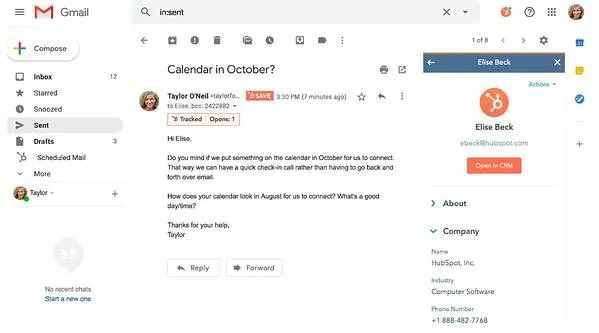
Best for: Teams that want sales, marketing and customer service in one connected suite.
Main trade-off: The advanced sales features tested here require a higher-priced Sales Hub plan, with an additional onboarding fee.
HubSpot is a marketing automation platform turned everything platform. It was founded in 2006 to make marketing automation easier.
Nowadays, HubSpot’s main selling point is offering an all-in-one solution, including marketing, sales, service and operations. If you don’t like using different apps and integrating them (using tools like Zapier and native integrations), then HubSpot might be what you’re looking for.
To get CRM functionality that is comparable to what you’re getting with the other CRMs in this ranking, you need to get two HubSpot products: its CRM and its Sales Hub.
In terms of Gmail integration, HubSpot does a fair job, although the pricing to get all this handy functionality (7 features) is quite steep, starting at $90/seat/month billed annually (plus $1500 for onboarding).
“[I like the] contact management to keep track of all your interactions. Email tracking and automation. I love that I can see when prospects open my email and what links they clicked on. Track the progress of my deals.” writes Karrie C., sales person at a small telco, about HubSpot Sales Hub.
Testing it out
Testing HubSpot was a mixed experience. The setup process was straightforward, and the integration with Gmail was solid. I liked that I could update and use the CRM directly from my inbox, which made managing my sales pipeline much easier. The live email and calendar sync were particularly useful, ensuring that all my communications were logged without any extra steps.
However, I found that HubSpot’s Gmail integration lacked some advanced features available in other CRMs. For instance, while it could send automated email sequences, it didn’t auto-create contacts from emails or meetings. This meant I still had to manually input some data, which was a bit time-consuming.
Scoring
Features HubSpot CRM + Sales Hub offers: 7/10
- Update and use your CRM from within your Gmail inbox
- Live sync your Gmail emails & Google calendar meetings to the CRM
- Automatically enrich your contact database by syncing your contacts’ email signatures
- Send automated, personalized email sequences from your Gmail inbox
- Use (shared or private) email templates when sending emails from Gmail
- Track whether people open your emails and click on the links in your emails sent from Gmail
- See whether these people who clicked email links also visit your website, which pages and for how long
Features HubSpot CRM + Sales Hub doesn’t offer:
- Auto-create contacts for people you’re emailing or meeting with
- See who your colleagues know and how well, with “relationship strength scores” based on their email traffic
- Be reminded of emails you haven’t replied to or customer conversations that have gone quiet
G2 review scoring:
- Ease of Use: 8.7
- Ease of Setup: 8.3
- Meets Requirements: 8.6
- Quality of Support: 8.6
- Ease of Doing Business With: 8.7
- Ease of Admin: 8.6
Final result
- Gmail CRM feature score: 7/10
- Average G2 review score: 8.6/10
- Google Workspace Marketplace review score: 4.0/5 → 8.0/10
- FINAL SCORE: 7.9/10
Pricing
Pricing to get all of the above (7 of 10 features) on the HubSpot Sales Hub Professional plan:
- $90/seat/month(billed annually)
- $100/seat/month(billed monthly, but with annual commitment)
+ an extra required fee of $1500 for onboarding
HubSpot offers a free trial of 14 to 30 days.
4. Streak [7.7/10]
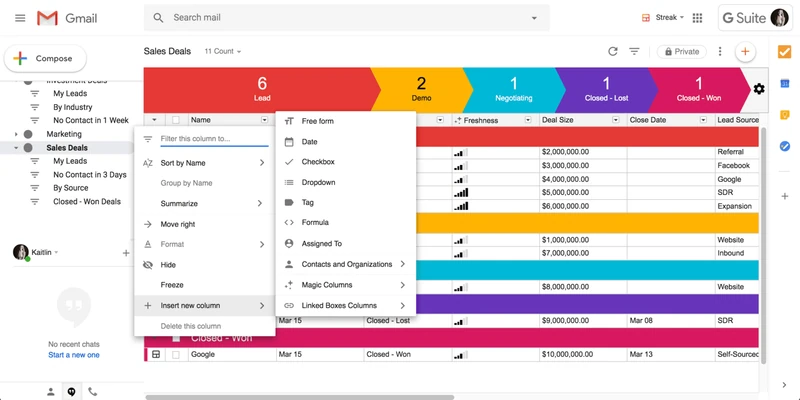
Best for: Gmail-first users with straightforward pipeline needs who want to manage their leads entirely within the inbox.
Main trade-off: Streak has no dedicated standalone web app, making it less suitable if you also want to manage sales outside Gmail.
When ranking CRMs for Gmail, one can not ignore Streak. Streak was founded in 2011 to be the dedicated CRM for Gmail, and it has stayed true to this mission ever since.
Compared to the other CRMs in this list, Streak has historically focused very much on solo users, which is epitomized by its once-popular free plan without collaboration functionality (and its affordable “Solo” plan upgrade), both since retired.
Streak runs entirely within the Gmail interface and that’s where it’s strongest. It has no dedicated web application and its mobile apps are a bit limited (getting 2.5 and 3 stars in the App Store and on Google Play).
Still, if you’re a single user and don’t use your CRM on your phone, Streak can be a simple and strong solution to start managing your leads.
Do note that to get all the 6 below features, you need to get on its Pro plan for teams, which will set you back $59/user/month (billed monthly).
Testing it out
Using Streak felt like a natural extension of Gmail, which was its biggest strength. The entire CRM operates within the Gmail interface, so there was no need to switch between tabs or applications. Setting it up was a breeze, and I could start managing my leads and deals right from my inbox.
One of the most helpful features was the email tracking, which showed me when recipients opened my emails and clicked on links. However, Streak’s focus on solo users was evident. While it worked well for individual use, it lacked some of the collaborative features I needed for my team, which made it less ideal for a growing business.
Scoring
Features Streak offers: 6/10
- Update and use your CRM from within your Gmail inbox
- Live sync your Gmail emails & Google calendar meetings to the CRM
- Send automated, personalized email sequences from your Gmail inbox
- Use (shared or private) email templates when sending emails from Gmail
- Track whether people open your emails and click on the links in your emails sent from Gmail
- Be reminded of emails you haven’t replied to or customer conversations that have gone quiet
Features Streak doesn’t offer:
- Auto-create contacts for people you’re emailing or meeting with
- Automatically enrich your contact database by syncing your contacts’ email signatures
- See who your colleagues know and how well, with “relationship strength scores” based on their email traffic
- See whether these people who clicked email links also visit your website, which pages and for how long
G2 review scoring:
- Ease of Use: 8.8
- Ease of Setup: 9.2
- Meets Requirements: 8.9
- Quality of Support: 8.7
- Ease of Doing Business With: 9.2
- Ease of Admin: 9.2
Final result
- Gmail CRM feature score: 6/10
- Average G2 review score: 9.0/10
- Google Workspace Marketplace review score: 4.0/5 → 8.0/10
- FINAL SCORE: 7.7/10
Pricing
Pricing to get all of the above (6 of 10 features) on the Streak Pro plan:
- $49/user/month (billed annually)
- $59/user/month (billed monthly)
Streak offers a free trial of 14 days.
5. folk [7.4/10]
Best for: Teams focused on relationship management, prospecting and warm introductions.
Main trade-off: Deeper outreach happens in folk itself. Its Gmail Sender does not send sequences or track opens and clicks, even though the broader product offers those features.
Folk is a CRM platform founded in 2020 that focuses on relationship management, prospecting and lightweight collaboration.
It is a good-looking, modern CRM for teams that want to centralize contacts, track interactions, build lists and follow up without ending up in a giant enterprise CRM. It also works well with Gmail in a few useful ways: it can sync Gmail emails and Google Calendar meetings, capture contacts from Gmail threads, and let you use message templates from inside Gmail through its Chrome extension.
That said, I’d be careful not to confuse “works with Gmail” with “is a deeply integrated Gmail CRM”.
Folk’s Gmail integration is more of a capture-and-context layer than a full CRM that lives inside Gmail. Its Chrome extension helps you add contacts, notes, reminders and templates from Gmail, but the deeper outreach features happen in Folk itself. More importantly for this comparison, some features that sound Gmail-related don’t literally work from Gmail: Folk’s own help docs say its Gmail Sender can’t send sequences and doesn’t track opens, clicks or bounces.
That doesn’t mean Folk has no sequences or email analytics. It does. But they’re not available through its Gmail Sender, so I’m not counting them as Gmail-native CRM features here.
So Folk deserves a place in this ranking, especially for teams that care about relationship intelligence, prospecting and keeping track of warm relationships. But if you’re looking for the strongest CRM experience directly inside Gmail, it’s not as complete as the marketing may make it sound.
Testing it out
When I tested Folk, the setup was easy. Connecting a Google account was straightforward, and Folk started syncing contacts, emails and calendar events into the CRM.
The folkX Chrome extension was the most useful part of the Gmail experience. From Gmail, I could capture people from email threads, look up existing context, add notes, set reminders and use templates in emails. That makes Folk handy if you often work from Gmail but still want your relationship data organized in a CRM.
I also liked Folk’s relationship intelligence. It can show who on your team has the strongest connection with a contact, based on shared interactions. That is useful for founders, agencies, investors, recruiters and partnership teams where warm introductions matter.
Where Folk felt weaker was in the stricter Gmail CRM use case. It didn’t feel like I could run the full CRM from Gmail. And while Folk has email campaigns, sequences and analytics in the broader product, these are not fully Gmail-native. Its Gmail Sender can send emails, but it can’t send sequences and it doesn’t track opens or clicks. That’s an important limitation for this comparison.
So my summary is: Folk is a polished relationship CRM that connects well with Gmail, but it is not one of the deepest Gmail CRMs in this list.
Scoring
Features Folk offers: 6/10
- Update and use your CRM from within your Gmail inbox
- Live sync your Gmail emails & Google Calendar meetings to the CRM
- Auto-create contacts for people you’re emailing or meeting with
- Use email templates when sending emails from Gmail
- See who your colleagues know and how well, with “relationship strength scores” based on their email traffic
- Be reminded of emails you haven’t replied to or customer conversations that have gone quiet
Features Folk doesn’t offer:
- Automatically enrich your contact database by syncing your contacts’ email signatures
- Send automated, personalized email sequences from your Gmail inbox
- Track whether people open your emails and click on the links in your emails sent from Gmail
- See whether these people who clicked email links also visit your website, which pages and for how long
G2 review scoring:
- Ease of Use: 9.0
- Ease of Setup: 8.9
- Meets Requirements: 8.4
- Quality of Support: 9.1
- Ease of Doing Business With: 8.9
- Ease of Admin: 8.7
Final result
- Gmail CRM feature score: 6/10
- Average G2 review score: 8.8/10
- Google Workspace Marketplace review score: no listing/rating found → average substitute: 7.3/10
- FINAL SCORE: 7.4/10
Pricing
Pricing to get all of the above (6 of 10 features) on the Folk Standard plan:
- $24/member/month (billed annually)
- $30/member/month (billed monthly)
Folk’s Premium plan costs $48/member/month billed annually or $60/member/month billed monthly. You need it for email sequences, custom objects & deals, dashboards, API access and full interaction history. As sequences are not counted as a Gmail-native feature here, I’m using the Standard plan as the fair comparison point.
Folk offers a free trial of 14 days.
6. Freshsales by Freshworks [6.6/10]
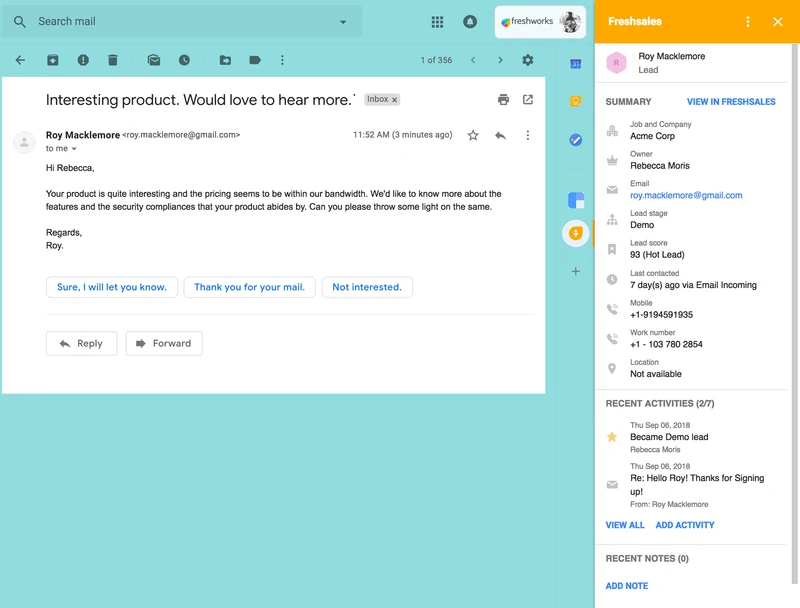
Best for: Teams that prioritize a broad sales feature set and want access to contacts and deals from Gmail.
Main trade-off: The Gmail integration does not automatically create contacts or enrich them from email signatures, leaving more contact upkeep to your team.
Freshworks offers Freshsales, a sales CRM from Freshworks, the company behind / initially called Freshdesk. The company was founded in 2010 to provide a better, cheaper solution for customer service teams.
This CRM’s main selling point is its feature depth. It has also managed to offer this range of functionality through an easier to use interface than its competitor/predecessor from the same city, Zoho.
While its Gmail integration is not as deep as with better performing CRMs in this ranking, it still deserves a mention in this ranking due to its relatively popular Gmail add-on.
Testing it out
Testing Freshsales by Freshworks, I found its Gmail integration to be functional but not as robust as some other CRMs. The setup was relatively easy, and I appreciated that I could manage my contacts and deals from within my Gmail inbox. The live sync for emails and calendar events worked well, ensuring that all my interactions were logged in the CRM.
The automated email sequences and tracking features were useful, but I felt that Freshsales by Freshworks could benefit from more advanced features like automatic contact creation and data enrichment. These omissions meant that I still had to spend time manually updating contact information, which was less efficient than I had hoped.
Scoring
Features Freshworks offers in Freshsales: 4/10
- Update and use your CRM from within your Gmail inbox
- Live sync your Gmail emails & Google calendar meetings to the CRM
- Send automated, personalized email sequences from your Gmail inbox
- Track whether people open your emails and click on the links in your emails sent from Gmail
Features Freshworks doesn’t offer in Freshsales:
- Auto-create contacts for people you’re emailing or meeting with
- Automatically enrich your contact database by syncing your contacts’ email signatures
- Use (shared or private) email templates when sending emails from Gmail
- See who your colleagues know and how well, with “relationship strength scores” based on their email traffic
- See whether these people who clicked email links also visit your website, which pages and for how long
- Be reminded of emails you haven’t replied to or customer conversations that have gone quiet
G2 review scoring:
- Ease of Use: 9.0
- Ease of Setup: 8.7
- Meets Requirements: 8.7
- Quality of Support: 8.8
- Ease of Doing Business With: 9.0
- Ease of Admin: 8.9
Final result
- Gmail CRM feature score: 4/10
- Average G2 review score: 8.9/10
- Google Workspace Marketplace review score: 3.5/5 → 7.0/10
- FINAL SCORE: 6.6/10
Pricing
Pricing to get all of the above (4 of 10 features) on the Freshsales Enterprise plan*:
- $59/user/month(billed annually)
- $71/user/month(billed monthly)
* Sequences with stricter limits also available on Pro plan
Freshsales by Freshworks offers a free trial of 21 days.
7. Zoho CRM [5.6/10]
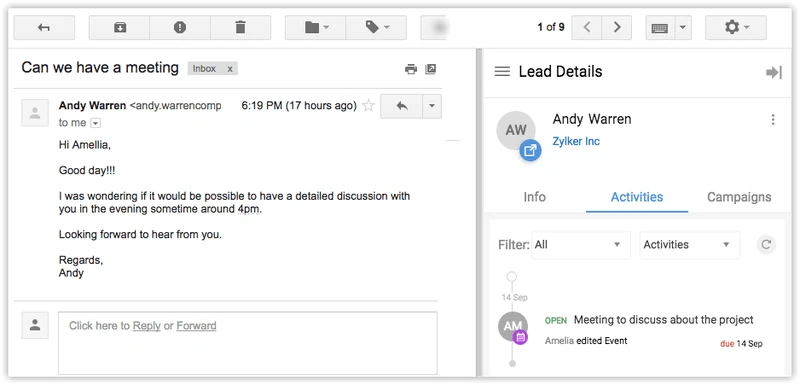
Best for: Budget-conscious teams that need basic CRM access and email/calendar sync from Gmail.
Main trade-off: Gmail automation is limited in this comparison, with manual contact creation and no automatic signature enrichment.
Zoho is a true household name in the CRM industry, so I couldn’t omit them from this ranking.
Zoho launched its small business CRM product in 2005 and has historically been positioning itself as a cheaper alternative to Salesforce. That is immediately its main selling point.
If you’re looking for a CRM solution, Zoho has many tiers (and products even: Zoho CRM, Zoho CRM Plus, Zoho One, …). The two Gmail integration features below are already available on its free plan of its standard Zoho CRM product. Do note that its Gmail add-on is rated 3.4/5 on the Google Workspace Marketplace, and that this is what keeps Zoho out of last place in this ranking.
Testing it out
My experience with Zoho CRM was a bit underwhelming. While the basic Gmail integration was there, allowing me to update and use the CRM from my inbox, it lacked many of the advanced features that other CRMs offered. Setting it up was straightforward, and syncing emails and calendar events to the CRM worked fine.
However, Zoho CRM did not automatically create contacts from my emails or meetings, nor did it enrich my contact data by syncing email signatures. This meant a lot of manual data entry, which was time-consuming and somewhat frustrating. Additionally, the interface felt a bit dated and less intuitive compared to other CRMs I tested.
Scoring
Features Zoho CRM offers: 2/10
- Update and use your CRM from within your Gmail inbox
- Live sync your Gmail emails & Google calendar meetings to the CRM
Features Zoho CRM doesn’t offer:
- Auto-create contacts for people you’re emailing or meeting with
- Automatically enrich your contact database by syncing your contacts’ email signatures
- Send automated, personalized email sequences from your Gmail inbox
- Use (shared or private) email templates when sending emails from Gmail
- See who your colleagues know and how well, with “relationship strength scores” based on their email traffic
- Track whether people open your emails and click on the links in your emails sent from Gmail
- See whether these people who clicked email links also visit your website, which pages and for how long
- Be reminded of emails you haven’t replied to or customer conversations that have gone quiet
G2 review scoring:
- Ease of Use: 8.3
- Ease of Setup: 8.0
- Meets Requirements: 8.4
- Quality of Support: 7.7
- Ease of Doing Business With: 8.0
- Ease of Admin: 8.0
Final result
- Gmail CRM feature score: 2/10
- Average G2 review score: 8.1/10
- Google Workspace Marketplace review score: 3.4/5 → 6.8/10
- FINAL SCORE: 5.6/10
Pricing
Pricing to get all of the above (2 features) on the Zoho Free plan:
- Free
Zoho CRM offers a free trial of 15 days.
8. Pipedrive [4.9/10]
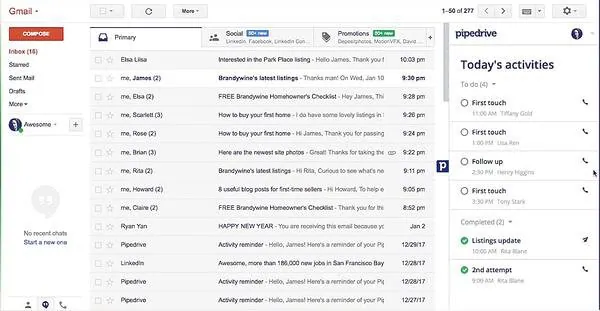
Best for: Small sales teams that prioritize a simple visual pipeline and straightforward setup.
Main trade-off: More of the sales workflow happens in Pipedrive itself. Its Gmail integration offers fewer features directly in the inbox and requires manual contact upkeep.
Pipedrive is an easy-to-use and easy-to-setup sales CRM for small businesses, and is therefore compared to Salesflare very often.
The company was founded in 2010 to launch a counterreaction to enterprise CRMs like Salesforce, which are built more for enterprise needs than they are for sales teams. Pipedrive set out to change that and made it super easy to track your sales.
“I enjoy the simple over[view] of all phases of a lead. It´s neat, clean, and tidy, along with an easy interface. I love the options of using the function to check if my lead is reading, and keeping all email interactions nice and neat, under the same category. This removes confusion, guess work and having multiple email inboxes.” writes Nektarios I., an account manager at a consulting services company, about Pipedrive.
While the company has been doing its best in recent years to build out a closer Gmail integration, it still has some work to do on this front. Its relatively low depth of integration, combined with an abysmal rating on the Google Workspace Marketplace, makes it land in last place for this Gmail CRM ranking.
Testing it out
When I tested Pipedrive, the first thing I noticed was its ease of use and setup. The interface is user-friendly, and getting started was quick. The Gmail integration allowed me to update and manage my CRM from within my inbox, which was convenient. However, the depth of integration left something to be desired.
Pipedrive synced my emails and calendar events well, but it didn’t automatically create contacts or enrich contact data from email signatures. This meant I had to manually input a lot of information, which was time-consuming. Additionally, the lack of features like email tracking and automated sequences made it feel less powerful compared to other CRMs.
Scoring
Features Pipedrive offers: 2/10
- Update and use your CRM from within your Gmail inbox
- Live sync your Gmail emails & Google calendar meetings to the CRM
Features Pipedrive doesn’t offer:
- Auto-create contacts for people you’re emailing or meeting with
- Automatically enrich your contact database by syncing your contacts’ email signatures
- Send automated, personalized email sequences from your Gmail inbox
- Use (shared or private) email templates when sending emails from Gmail
- See who your colleagues know and how well, with “relationship strength scores” based on their email traffic
- Track whether people open your emails and click on the links in your emails sent from Gmail
- See whether these people who clicked email links also visit your website, which pages and for how long
- Be reminded of emails you haven’t replied to or customer conversations that have gone quiet
G2 review scoring:
- Ease of Use: 8.8
- Ease of Setup: 8.7
- Meets Requirements: 8.5
- Quality of Support: 8.4
- Ease of Doing Business With: 8.7
- Ease of Admin: 8.6
Final result
- Gmail CRM feature score: 2/10
- Average G2 review score: 8.6/10
- Google Workspace Marketplace review score: 2.1/5 → 4.2/10
- FINAL SCORE: 4.9/10
Pricing
Pricing to get all of the above (2 of 10 features) on the Pipedrive Premium plan:
- $59/seat/month (billed annually)
- $79/seat/month (billed monthly)
Pipedrive offers a free trial of 14 days.
Frequently asked questions
What is the best CRM for Gmail?
Salesflare is my top pick for small and medium-sized B2B teams that want less CRM admin through automatic contact and activity capture, enrichment and a full CRM inside Gmail. Choose Copper for a Google Workspace focus, Streak for a pipeline entirely inside Gmail, or HubSpot if a combined sales, marketing and service suite matters more. Compare the required plans as well as the integration features.
Does Gmail have a built-in CRM system?
No. Gmail provides contacts, labels and basic task tools but lacks a true CRM’s lead management, deal tracking or automated follow-ups. You can layer in add-ons or extensions (like Salesflare’s Gmail add-in) to turn your inbox into a full-featured CRM.
How do I integrate Salesflare with Gmail?
Install the Salesflare Chrome (or Firefox) extension and grant the CRM access to your Gmail account. Once enabled, every sent and received email is automatically logged, contacts are auto-created and you’ll see all CRM info inside your inbox sidebar.
What features should I look for in a Gmail CRM?
Key features include automatic email logging, contact & calendar sync, email-open & link-click tracking, task/reminder automation, templates & sequences, and a clean inbox-embedded UI. Salesflare covers all of these out of the box.
Are there free or low-cost CRM plugins for Gmail?
Yes. Salesflare provides a 30-day free trial, HubSpot CRM has free tools, and Zoho CRM has a free plan. After the trial, Salesflare is paid but includes deeper automation and data enrichment than most free options.
How secure are Gmail CRM add-ons?
Security varies by vendor, but reputable CRM add-ons use OAuth scopes, encrypt data in transit and at rest, and comply with GDPR standards. Salesflare stores data on EU servers, offers two-factor authentication and undergoes regular security audits to ensure your Gmail data stays protected.
Can I use my Gmail CRM on mobile?
Absolutely. Most Gmail-integrated CRMs offer responsive web apps or native iOS/Android applications. Salesflare, for example, provides a full fledged mobile app with live notifications and – on Android – call history integration, so you can manage deals and follow-ups on the go.
Want to dig deeper into the differences? Just ask our team using the chat on salesflare.com. We’re here to help 😄
Not sure about Gmail by the way? I also wrote a guide with Outlook CRMs.
Or if you’re still in full exploration mode, check out these CRM examples.


I hope you liked this post. If you did, spread the word!
👉 You can follow @salesflare on Twitter, Facebook and LinkedIn.