How to Use ChatGPT in B2B Sales: Full Guide [2026]

Unlock Your Sales Potential using AI
ChatGPT has changed a lot. It is no longer just a clever chatbot that writes decent emails if you ask nicely. In 2026, it is closer to an AI workbench for sales: it can search the web, analyze files, work with spreadsheets, use connected apps, remember context, organize work into projects, generate images, talk with you by voice, and even complete multi-step tasks through agent mode.
For B2B sales teams, that matters. Sales is full of information work: researching prospects, preparing for calls, writing relevant outreach, summarizing meetings, analyzing pipeline data, handling objections, creating proposals, and following up at the right time. ChatGPT can help with all of that.
But here is the catch: most salespeople still use it like a fancy autocomplete tool. They ask for “a follow-up email” and get a generic, slightly shiny, very forgettable email back. That is not where the real leverage is.
The real leverage comes from giving ChatGPT the right context, using the right mode for the job, connecting it to the right sources, and keeping a human in the loop where judgment matters. That is how you turn it from a novelty into a serious B2B sales assistant.
This guide explains how ChatGPT works, what has changed recently, which features matter most for sales, and how to use it practically without turning your sales process into an AI-generated mess.
1. What ChatGPT Actually Is in 2026
The simplest way to think about ChatGPT is this: it is a language model plus tools.
The language model understands and generates text. The tools let it do useful work beyond text generation: searching the web, reading files, running data analysis, creating charts, using connected apps, generating images, or navigating websites through agent mode.
The Power of Language Models
At its core, ChatGPT is powered by large language models. These models are trained to understand patterns in language, code, structure, and context. They do not “think” like humans, but they can reason over instructions, infer what you probably mean, and generate useful output from messy input.
For sales, this makes ChatGPT particularly good at tasks like:
- Turning messy meeting notes into structured CRM notes
- Summarizing long prospect websites or reports
- Drafting first versions of emails, LinkedIn messages, call scripts, and proposals
- Rewriting messages for clarity, tone, and relevance
- Analyzing sales data and finding patterns
- Preparing discovery questions and objection-handling angles
- Roleplaying a prospect, buyer, champion, blocker, or competitor
The quality of the output depends heavily on the quality of the context. A lazy prompt creates lazy output. A good brief creates something you can actually use.
Tokens: The Building Blocks
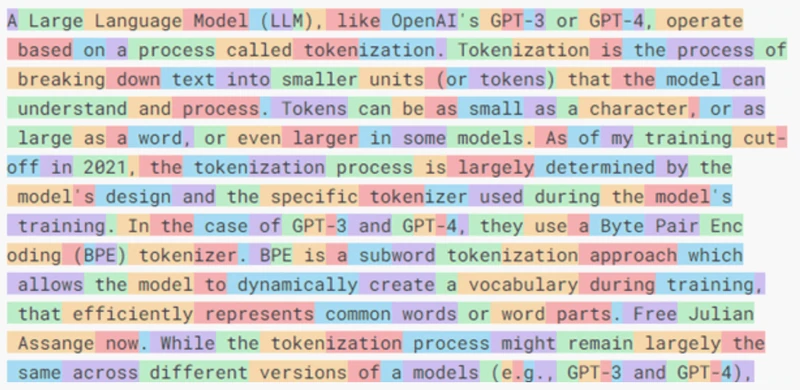
ChatGPT processes text in tokens, not words. A token can be a whole word, part of a word, punctuation, or formatting. Roughly speaking, 100 tokens equals about 75 English words.
This matters because every model has a context window: the amount of information it can consider at once. If you paste a 60-page RFP, five call transcripts, three proposals, and a spreadsheet into one chat, you are asking ChatGPT to keep a lot in its head. Modern models can handle much larger context windows than older ones, but context is still not magic. The more focused the input, the better the output.
From Chatbot to Workbench
The older way to use ChatGPT was simple: type a question, get an answer. The newer way is richer:
- Model: Choose the right level of speed and reasoning.
- Context: Give it your role, product, target customer, deal stage, notes, constraints, and desired output.
- Tools: Let it search, analyze files, create charts, generate images, or work with code when useful.
- Apps: Connect tools such as Gmail, Outlook, Google Drive, SharePoint, Slack, or other approved apps when you want ChatGPT to use your own data.
- Agent Mode: Let it execute a multi-step workflow, while pausing for confirmation when needed.
That shift is important. ChatGPT is now less like “a place to ask questions” and more like “a place to get knowledge work done.”
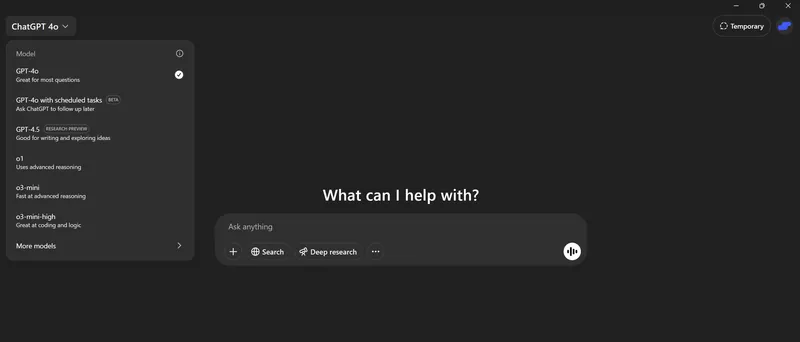
Mixture of Experts and Routing: Why the Model Picker Keeps Changing
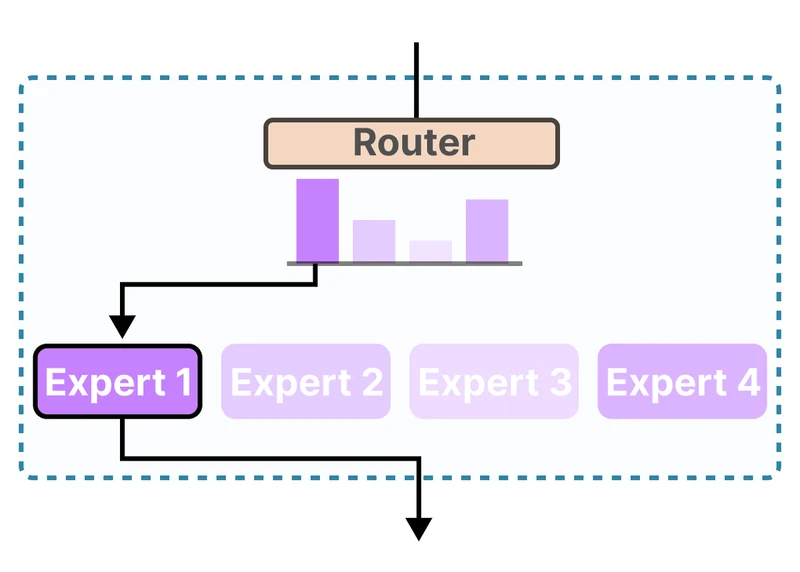
You may have noticed that ChatGPT’s model picker changes often. That is not just a design whim. Modern AI systems increasingly route your request to different model configurations depending on what you are trying to do.
Some tasks need speed: rewriting a sentence, summarizing a short email, generating subject lines. Other tasks need deeper reasoning: account strategy, pricing analysis, RFP review, competitive positioning, or interpreting financial reports. The product is moving toward letting you choose the amount of reasoning effort rather than forcing you to understand every model name.
2. Your ChatGPT Command Center: Ways to Access It
ChatGPT is not confined to one website anymore. The best sales workflows usually combine several access points.
Web App
The web app at ChatGPT is still the main hub. It is the best place for deeper work: research, file analysis, projects, connected apps, long-form writing, tables, charts, and agent workflows.
Use the web app when you are preparing for an important call, building a proposal, reviewing a pipeline export, researching a target account, or working on longer sales assets.
Desktop App
The desktop apps for Windows and macOS are useful when ChatGPT needs to live closer to your daily workflow. You can quickly bring it up while you are in your CRM, inbox, browser, spreadsheet, or document editor.
For salespeople, the practical use is simple: keep ChatGPT one shortcut away. Use it to rewrite a message, summarize a page, structure meeting notes, or sanity-check an answer before sending it.
Mobile App
The mobile app is particularly useful for salespeople on the move. You can dictate notes after a meeting, ask for a quick summary, take a picture of a whiteboard, talk through an objection, or brainstorm follow-up ideas while walking between meetings.
Voice and video capabilities make this much more natural than typing long prompts on a phone. You can explain what happened in a call and ask ChatGPT to turn it into clean next steps before you forget the details.
Apps and Connectors
One of the biggest changes is that ChatGPT can now work with approved apps and connectors. Depending on your plan, region, workspace settings, and permissions, this can include tools such as email, calendars, document storage, Slack, spreadsheets, and other business systems.
For sales, this opens up much more useful workflows:
- Summarize a long email thread before replying
- Draft a follow-up based on a calendar meeting and related notes
- Find relevant context in a document repository
- Search Slack for what was discussed about a prospect
- Use a spreadsheet as the basis for analysis or planning
The rule is simple: connect only what you need, review permissions regularly, and be extra careful when using sensitive customer or internal data.
Shortcuts That Matter
Keyboard shortcuts change over time, so the safest habit is to open the shortcut list from within ChatGPT and learn the few you use daily. The most useful ones are usually:
- Open a new chat
- Focus the message composer
- Copy the last response
- Open the desktop companion window
- Search or jump between conversations
For sales work, speed matters. If ChatGPT takes too much effort to open, you will stop using it. Make it part of your workflow instead of a separate destination.
3. Set Up ChatGPT for Sales: Custom Instructions, Memory, Projects, and Apps
Generic ChatGPT gives generic answers. A properly configured ChatGPT gives you outputs that sound more like they came from someone who understands your market, product, customer, and sales process.
Custom Instructions and Personalization
Custom instructions tell ChatGPT how you want it to behave across conversations. This is where you add stable context: your role, company, product, target audience, writing preferences, and output rules.
For a B2B salesperson, useful instructions include:
- Your role and company
- Your ideal customer profile
- Your product positioning
- Your common buyer personas
- Your tone of voice
- Your preferred email length
- Your rules for outreach, follow-up, and objection handling
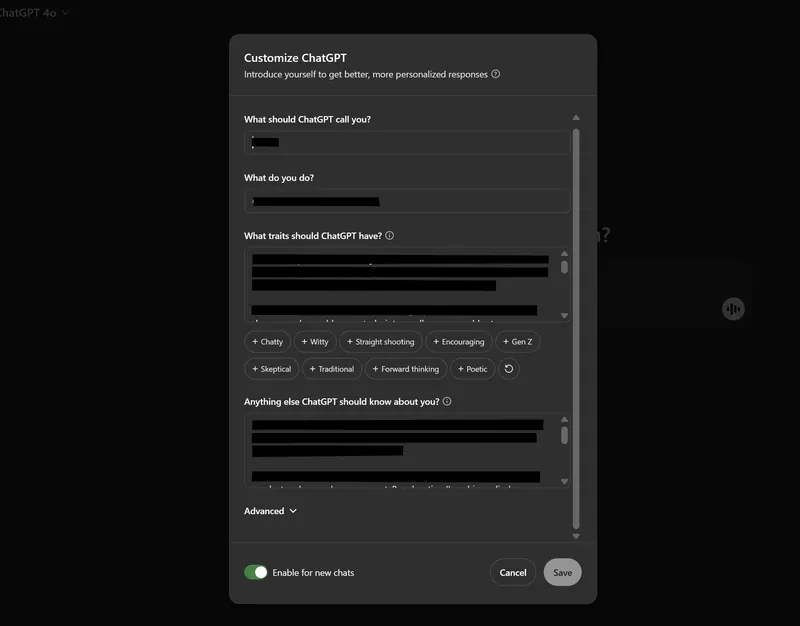
Example for a B2B SaaS salesperson:
What traits should ChatGPT have: Be direct, helpful, and pragmatic. When drafting sales emails, keep them concise, specific, and human. Avoid hype, clichés, fake urgency, and over-polished AI language. Prefer clear next steps and concrete value over generic benefits. When making recommendations, explain the reasoning briefly.
Anything else ChatGPT should know: I sell B2B SaaS to small and medium-sized companies. My buyers are busy founders, sales leaders, and operations people. They care about saving time, following up properly, and keeping customer data accurate without creating admin work. My goal is to book relevant meetings, help prospects understand fit, and move serious opportunities forward.
Memory: Useful, but Not a CRM
Memory lets ChatGPT remember useful details across chats. It can remember your preferences, recurring projects, writing style, and ongoing work. This reduces the need to explain everything again every time.
For sales, memory is useful for your own working preferences. It is not a substitute for your CRM. Do not rely on ChatGPT memory as the source of truth for deal stages, commitments, follow-up dates, or customer history. Your CRM should remain the system of record.
Good things for ChatGPT to remember:
- Your preferred email style
- Your target customer profile
- Your product positioning
- Your common sales methodology
- Your preferred meeting summary format
Bad things to rely on ChatGPT memory for:
- Exact commitments made by prospects
- Contract terms
- Discount approvals
- Confidential customer information
- Anything that belongs in your CRM, calendar, or legal system
Projects: Keep Deal Work Together
Projects let you group related chats, files, and instructions. This is useful for long-running sales work, especially when several chats belong to the same account, industry, proposal, or campaign.
A good project setup could be:
- Top Accounts: Research, call prep, notes, proposals, and stakeholder maps
- Outbound Campaigns: ICP definitions, message tests, objection handling, and sequences
- Competitive Deals: Competitor notes, positioning, pricing comparisons, and counterarguments
- Sales Enablement: Scripts, templates, objection libraries, onboarding material, and playbooks
For sensitive or account-specific work, use project-specific instructions and be careful about what memory can use outside the project.
Apps: Connect Carefully
Apps and connectors can make ChatGPT far more useful, because it can reference the actual files, emails, calendars, and messages you work with. But access is power. Treat it like you would treat a new team member with access to company data.
Best practices:
- Connect only the apps you actively need
- Check what each app can read or write
- Use read-only access where possible
- Be careful with customer data, contracts, pricing, and HR information
- Disable apps you no longer use
- Use business or enterprise controls for team-wide usage
4. Choosing the Right Model or Mode for the Sales Task
The model picker has changed several times and will probably change again. In 2026, the practical question is less “Which model name do I pick?” and more “How much speed, reasoning, autonomy, and risk do I need?”
As of mid-2026, ChatGPT’s main model family is GPT-5.5. GPT-5.5 Instant is the everyday fast model. GPT-5.5 Thinking is for harder reasoning. GPT-5.5 Pro is for the most demanding work on Pro-level plans. GPT-5.6 Sol, Terra, and Luna are in limited preview and not yet something most sales teams should build workflows around.
The Practical Model Guide for Sales
| Mode / model choice | Best for | Sales examples |
|---|---|---|
| Instant | Fast everyday work | Rewrite an email, summarize a short note, generate subject lines, clean up CRM notes |
| Medium / High reasoning | Harder thinking with better accuracy | Account planning, objection handling, proposal review, pricing comparison, call prep |
| Extra High / Pro | Complex work where quality matters more than speed | Board-level account strategy, RFP response review, strategic positioning, complex negotiation prep |
| Search | Fresh facts and quick current information | Recent company news, funding rounds, leadership changes, competitor announcements |
| Deep Research | Documented research across many sources | Market analysis, account intelligence reports, industry trend research, competitor teardown |
| Agent Mode | Multi-step workflows that require actions | Gather account research, update a spreadsheet, navigate websites, compare vendors, prepare a briefing |
| Data analysis | Spreadsheets, CSVs, charts, and calculations | Pipeline analysis, win-rate breakdowns, territory performance, churn or expansion analysis |
When to Use Instant
Use Instant for speed. It is ideal when the task is simple and the cost of being slightly less nuanced is low.
Good examples:
- “Make this email shorter and warmer.”
- “Turn these notes into bullet points.”
- “Give me 10 subject line ideas.”
- “Rewrite this LinkedIn message so it sounds less robotic.”
When to Use Deeper Reasoning
Use deeper reasoning when there are multiple constraints, real business judgment, or a risk of missing something important.
Good examples:
- “Review this proposal and identify where the buyer may push back.”
- “Compare these two pricing options and recommend the stronger negotiation path.”
- “Analyze this call transcript and tell me what the real buying criteria are.”
- “Build an account plan for this prospect based on their website, our notes, and recent news.”
When to Use Agent Mode
Use Agent Mode when the task is not just “answer this” but “go do this.” Agent Mode can navigate websites, use tools, work with files, use connected apps, fill out forms, and edit spreadsheets, while pausing when it needs your confirmation.
Good sales uses include:
- Build a target-account briefing from public sources and connected notes
- Find relevant recent news for your top accounts and prepare talking points
- Compare a prospect’s website against your ICP criteria
- Turn a spreadsheet of accounts into prioritized research tasks
- Draft follow-ups based on meeting notes and prior email context
Do not use Agent Mode for vague instructions like “check my email and handle everything.” That is how you get chaos wearing a productivity costume.
5. Prompting: How to Get Useful Sales Output
Prompting is not about magic phrases. It is about briefing ChatGPT like you would brief a smart colleague.
A weak prompt says:
Write a follow-up email.
A useful prompt says:
Draft a concise follow-up email after a 30-minute demo with the VP Sales of a 45-person B2B software company. Their main issue is that reps forget to follow up and management lacks pipeline visibility. Keep it under 140 words, avoid hype, mention the two features they cared about most, and suggest a 20-minute call next Tuesday or Thursday to map their process.
That is the difference between generic and usable.
The Sales Prompt Formula
For most sales tasks, use this structure:
- Role: Tell ChatGPT who it should act as.
- Goal: Explain what you want to achieve.
- Context: Add account, prospect, meeting, product, and deal information.
- Constraints: Set length, tone, format, must-include points, and must-avoid points.
- Output: Specify whether you want an email, table, bullets, call plan, summary, or checklist.
- Quality bar: Ask it to flag assumptions, weak points, and missing information.
Prompt Examples You Can Reuse
Prospect research:
Act as a B2B sales researcher. Research this company: [company URL]. I sell [short product description] to [ICP]. Give me: 1) what the company does, 2) likely pain points, 3) buying triggers, 4) relevant recent news, 5) possible stakeholders, 6) three personalized outreach angles. Clearly separate facts from assumptions.
Call preparation:
Prepare me for a discovery call with [prospect name], [role] at [company]. Context: [paste notes]. Create a call plan with: opening, hypotheses to test, 10 discovery questions, likely objections, and the best next step if there is a fit.
Follow-up email:
Draft a follow-up email after this call. Use the notes below. Keep it under 150 words. Make it specific, useful, and low-pressure. Include: 1) what I understood, 2) the next step we agreed on, 3) one helpful reason to continue. Avoid generic phrases like “just checking in” and “hope you’re well.” Notes: [paste notes]
Objection handling:
A prospect says: “[objection]”. Give me three possible replies: one short email reply, one call response, and one more consultative answer. Keep it honest. Do not overpromise. Mention when I should disqualify instead of pushing.
Pipeline analysis:
Analyze this pipeline export. Find bottlenecks by stage, unusual aging, low-probability deals that are still forecasted, and opportunities where the next step is missing. Give me a management summary and a prioritized action list.
Conversation Management Features
The best results often come from iteration. Use these habits:
- Edit your prompt: If the answer is wrong, improve the input instead of arguing with the output.
- Interrupt long work: If you realize you forgot a constraint, interrupt or update the task instead of restarting from scratch.
- Branch conversations: Explore a different direction without ruining the original thread.
- Use writing blocks or document mode: For longer emails, proposals, reports, and sales playbooks.
- Ask for critique: After ChatGPT drafts something, ask what is weak, generic, risky, or unclear.
Canvas used to be the central editing feature for many long-form tasks. In newer ChatGPT workflows, more editing now happens directly in chat, writing blocks, documents, code blocks, and file outputs. The exact UI changes, but the principle stays the same: use ChatGPT as a collaborator, not a one-shot vending machine.
6. Bringing Your Own Data: Uploads, Analysis, and Spreadsheets
ChatGPT becomes much more useful when it can work with your actual sales material: prospect lists, call notes, CRM exports, proposal drafts, RFPs, product docs, pricing sheets, competitor pages, and customer feedback.
What You Can Upload
ChatGPT supports common documents, spreadsheets, presentations, text files, code files, images, and PDFs. In practice, the most useful uploads for sales are:
- CSV/XLSX: Pipeline exports, lead lists, win/loss data, activity data, survey results
- PDF/DOCX: RFPs, contracts, call transcripts, prospect reports, competitor whitepapers
- PPTX: Sales decks, pitch decks, board decks, webinar material
- Images/screenshots: Charts, dashboards, ads, website screenshots, whiteboards
- Text: Notes, email threads, call summaries, support conversations, product documentation
What to Do with Files
Here are practical sales uses:
- Turn call transcripts into clean CRM notes and next steps
- Extract decision criteria from a prospect’s RFP
- Compare your proposal against the prospect’s requirements
- Find risks or missing pieces in a contract draft
- Analyze a pipeline export by stage, owner, size, age, and next step
- Summarize customer feedback into recurring themes
- Turn a sales deck into a shorter follow-up document
- Create charts from spreadsheet data
ChatGPT for Excel and Google Sheets
A newer and very useful workflow is using ChatGPT inside Excel or Google Sheets. Instead of exporting a spreadsheet and uploading it separately, you can work in the sheet itself: ask for formulas, clean data, summarize columns, create trackers, or explain what a model is doing.
For sales operations, this is useful for:
- Cleaning lead lists
- Classifying accounts by ICP fit
- Finding duplicate companies
- Creating territory assignments
- Generating formulas
- Summarizing pipeline health
Always review spreadsheet outputs. AI can help you move faster, but formulas, filters, and calculations still need human verification before decisions are made.
RAG vs. Pasting: When to Use Which?
When giving ChatGPT text or documents, you usually have two options:
- Upload the file: Best for longer documents, PDFs, reports, decks, and spreadsheets. ChatGPT can retrieve the relevant parts and work with them.
- Paste the text directly: Best for shorter text where you want ChatGPT to consider the whole thing at once, such as one email thread, one call summary, or one proposal section.
If the task requires understanding the whole document’s logic, paste or provide a concise structured summary when possible. If the task requires finding facts in a large document, upload it and ask specific questions.
7. Research Modes: Search, Deep Research, and App-Connected Research
Salespeople need current information. Model knowledge alone is not enough for prospect research, because companies change: leadership, funding, hiring, layoffs, partnerships, pricing, product launches, acquisitions, and priorities all move.
Standard Search: Quick Current Facts
Use standard search when you need current information quickly.
Sales use cases:
- Recent news about a prospect
- Leadership changes
- Funding announcements
- New product launches
- Competitor pricing changes
- Industry events or regulation updates
Ask for sources. For important claims, open the sources yourself before using the information in a sales email or call.
Deep Research: Your Automated Analyst
Deep Research is for complex questions that need multiple sources, synthesis, and citations. It can use the public web, uploaded files, specific sites, and enabled apps, depending on your plan and settings.
Use it when the answer should look more like a structured research report than a quick chat response.
Sales use cases:
- Build a market map for a new vertical
- Research an enterprise account before a strategic outreach campaign
- Compare your positioning against several competitors
- Analyze a prospect’s industry trends and likely priorities
- Prepare a briefing for a large renewal or expansion conversation
A good Deep Research prompt includes the outcome, the audience, the sources to use or avoid, the desired format, and how much uncertainty you want surfaced.
Create a B2B sales briefing on [company]. Use public sources from the last 18 months and focus on buying triggers for [your product category]. Include: company summary, recent strategic moves, likely business priorities, possible pain points, relevant stakeholders, outreach angles, and open questions for discovery. Separate facts from inferences and cite sources.
App-Connected Research
The strongest research often combines public information with your internal context. For example, public web research can tell you what a company is doing. Your CRM, emails, calendar notes, Slack discussions, or shared docs can tell you what your team already knows.
That combination is powerful. It is also where you need the most discipline. Make sure ChatGPT has permission to access the relevant sources, and do not let it mix unverified assumptions into customer-facing messages.
8. Agent Mode and Scheduled Tasks: From Advice to Action
Agent Mode is one of the biggest practical changes for sales workflows. Instead of only answering, ChatGPT can work through a task: browse, use tools, consult files, use connected apps, fill out forms, edit spreadsheets, and report back.
What Agent Mode Is Good For
Use Agent Mode for tasks that have several steps and benefit from execution:
- Research 20 target accounts and fill a spreadsheet with summaries
- Prepare a call briefing using public sources and uploaded notes
- Compare several vendors or competitors and create a table
- Turn messy notes into a structured account plan
- Draft a sequence based on an ICP, value proposition, and recent market changes
- Check a list of company websites for signals such as hiring, funding, or technology usage
How to Use Agent Mode Safely
Agent Mode should be supervised. It can access sensitive information if you connect apps or log into websites. It can also encounter prompt injection: malicious instructions hidden inside pages, emails, comments, or documents.
Good rules:
- Start with a narrow task
- Tell it exactly which sources to use
- Require confirmation before sending, editing, deleting, or submitting anything
- Do not give it broad instructions like “handle my inbox”
- Review outputs before using them with prospects
- Disconnect apps that are not needed for the task
Scheduled Tasks
Scheduled Tasks let you ask ChatGPT to run reminders, recurring work, or monitoring checks. For sales, this is useful for staying on top of changes without manually searching every day.
Sales examples:
- Every Monday morning, summarize major news about my top 20 accounts
- Every Friday afternoon, review my open opportunities and flag missing next steps
- Check once a day whether a named prospect company has announced funding or leadership changes
- Remind me to follow up after a specific date
- Send a weekly competitive intelligence summary
Use scheduled work for monitoring and reminders, not for unsupervised prospect communication. Sending sales messages still deserves human review.
9. Voice, Mobile, and On-the-Go Sales Work
For salespeople, voice may be one of the most underrated ChatGPT features. After a call, your memory decays quickly. The best notes are often captured immediately, while the conversation is still fresh.
Use Voice for Meeting Debriefs
After a meeting, open ChatGPT and talk through what happened:
I just had a discovery call with [company]. Turn this into CRM notes, next steps, risks, and a follow-up email. Here is what happened: [dictate freely].
Then ask follow-up questions:
- “What did I miss?”
- “What are the real buying criteria?”
- “What should I ask next time?”
- “Is this a real opportunity or am I being optimistic?”
Use Voice for Roleplay
Voice mode is also useful for practicing conversations. Ask ChatGPT to act as a skeptical CFO, a busy founder, a technical evaluator, or a champion who needs internal help selling the project.
Roleplay a skeptical COO at a 100-person B2B services company. I sell [product]. Push back on price, implementation effort, and whether this is a real priority. After the roleplay, give me feedback on my answers.

10. Practical B2B Sales Workflows
Here are the highest-leverage ways to use ChatGPT in B2B sales today.
1. Prospect Research
Do not ask ChatGPT for a generic company summary. Ask it to research through the lens of your ICP and value proposition.
Research [company] as a potential customer for [product]. Focus on signs that they may struggle with [problem]. Give me: fit score, buying triggers, likely stakeholders, relevant recent news, personalization angles, and what I should not assume.
2. Account Planning
For larger deals, ChatGPT can help structure your thinking. Give it the account notes, stakeholders, timeline, pain points, objections, and current next step.
Build an account plan for this opportunity. Include stakeholder map, likely decision process, risks, missing information, next best actions, and a suggested plan for the next 30 days. Be critical. Tell me where this deal may be weak.
3. Personalized Outreach
ChatGPT can help draft outreach, but it needs specificity. The goal is not “personalization” by mentioning a random blog post. The goal is relevance.
Write a first outbound email to [persona] at [company]. Context: [research]. Our product helps with [problem]. Make the email about a likely business problem, not about our features. Under 110 words. No fake familiarity. End with a simple question.
4. Follow-Up Emails
The best follow-ups are specific, short, and tied to what the buyer actually said. Paste the meeting notes and ask ChatGPT to produce a follow-up that reflects the conversation.
Based on these meeting notes, draft a follow-up email. Mention the problem they described, the outcome they want, and the next step we agreed. Keep it direct and human. Do not add anything that was not discussed.
5. Discovery Questions
ChatGPT is good at helping you prepare discovery questions, especially if you give it the persona and likely pain points.
Create discovery questions for a call with a [persona] at a [company type]. They are evaluating [category]. I want to understand pain, impact, current process, decision criteria, urgency, stakeholders, and budget. Make the questions natural, not scripted.
6. Objection Handling
Use ChatGPT to explore objections from multiple angles: what the prospect says, what they may mean, what to ask, and when to disqualify.
The prospect says: “[objection]”. Analyze what this might really mean. Give me clarifying questions, a short answer, a stronger consultative answer, and signs that I should stop pushing.
7. Proposal and RFP Review
Upload the RFP, your proposal draft, or the buyer’s requirements. Ask ChatGPT to compare, critique, and find gaps.
Review this proposal against the buyer’s requirements. Identify missing requirements, weak sections, unsupported claims, unclear pricing, risky promises, and areas where we should be more specific. Then suggest edits.
8. Sales Coaching
Sales managers can use ChatGPT to coach reps more consistently. Feed it call notes, transcripts, or emails and ask for constructive feedback.
Act as a sales coach. Review this call transcript. Score discovery quality, listening, qualification, next-step control, and objection handling. Give specific coaching points and examples from the transcript.
9. CRM Hygiene
ChatGPT can help clean messy notes and summarize interactions, but your CRM should remain the source of truth. A good workflow is: capture raw notes, let ChatGPT structure them, then paste the result into the CRM after reviewing.
Turn these rough notes into a CRM update with: summary, pain points, stakeholders, decision process, next step, owner, deadline, risks, and open questions. Do not invent missing information.
10. Forecasting and Deal Risk
ChatGPT can be a useful second opinion on deal quality. It will not replace your judgment, but it can challenge optimistic assumptions.
Review this opportunity and identify forecast risk. Based on the notes, tell me whether this deal has clear pain, urgency, authority, budget, decision process, and next step. Be skeptical and list what evidence is missing.
11. What Not to Use ChatGPT For
ChatGPT is powerful, but it is not a magic sales brain. Used badly, it can create confident nonsense at impressive speed.
Do Not Use It to Spam People
AI makes it easy to generate large volumes of mediocre outreach. That does not make it a good idea. Buyers already receive enough generic messages. Use ChatGPT to make outreach more relevant, not more robotic.
Do Not Let It Invent Facts
For customer-facing messages, facts matter. If ChatGPT says a company recently launched something, changed leadership, raised funding, or uses a specific tool, verify it before mentioning it.
Do Not Treat It as Your CRM
ChatGPT can summarize, draft, and analyze. Your CRM should store the relationship history, deal stage, follow-up date, owner, tasks, and source of truth.
Do Not Share Sensitive Data Carelessly
Before uploading customer data, contracts, emails, or internal documents, check your company policy and the plan you are using. Business and enterprise plans usually have stronger admin, privacy, and compliance controls than personal plans.
Do Not Skip Human Judgment
ChatGPT can draft a negotiation email. It cannot own the relationship. It can suggest a next step. It cannot read the room like you can. It can analyze a pipeline export. It cannot know the political reality of a deal unless you provide it.
Use it as leverage, not as a replacement for judgment.
Conclusion: Your AI Sales Co-Pilot
ChatGPT is now much more than a Q&A tool. For B2B sales professionals, it can help research faster, prepare better, write more clearly, analyze sales data, summarize conversations, create account plans, and automate recurring information work.
The difference between average and excellent results comes down to how you use it. Give it real context. Choose the right mode. Connect the right sources. Ask it to critique its own output. Verify important facts. Keep your CRM as the source of truth. And do not use AI to scale bad sales habits.
The best salespeople will not be replaced by ChatGPT. But they will use it to spend less time on admin and more time on the work that actually moves deals forward: understanding buyers, building trust, and helping customers make good decisions.
That is the real promise of AI in sales. Not more noise. Better work.
Want a CRM with AI? We did our research on that too.

I hope you liked this post. If you did, spread the word!
👉 You can follow @salesflare on X/Twitter, Facebook and LinkedIn.